Month: December 2019

  • Automatic Fish Feeder

    Automatic Fish Feeder

    We’ve been “watching” my mother-in-law’s fish for the better part of two years. One of my least favorite tasks in the day is feeding the fish in the morning. There are a lot of morning tasks where putting my fingers near my mouth is a factor (brushing teeth, drinking coffee, etc.) and having to put nasty fish flakes on my hand is disruptive to those tasks.

    I decided to solve this with an Arduino and some stuff laying around the house. The project goal was to make a feeder that would feed the fish every 24 hours so I wouldn’t have to. I thought the hardest part would be the timer (spoiler alert: it was) but in actuality, engineering components that were never meant to feed fish was the really difficult and fun part.

    Inventory

    I bought and ELEGOO circuit board for the microcontroller, some random servos for the motorized mechanism, and a general electronics kit for wires and stuff. Don’t worry, those aren’t affiliate links playa… god forbid I get 20 extra cents.

    I started off by testing the board and some components. So far, so good.

    With that out of the way, I started working on getting the servo moving:

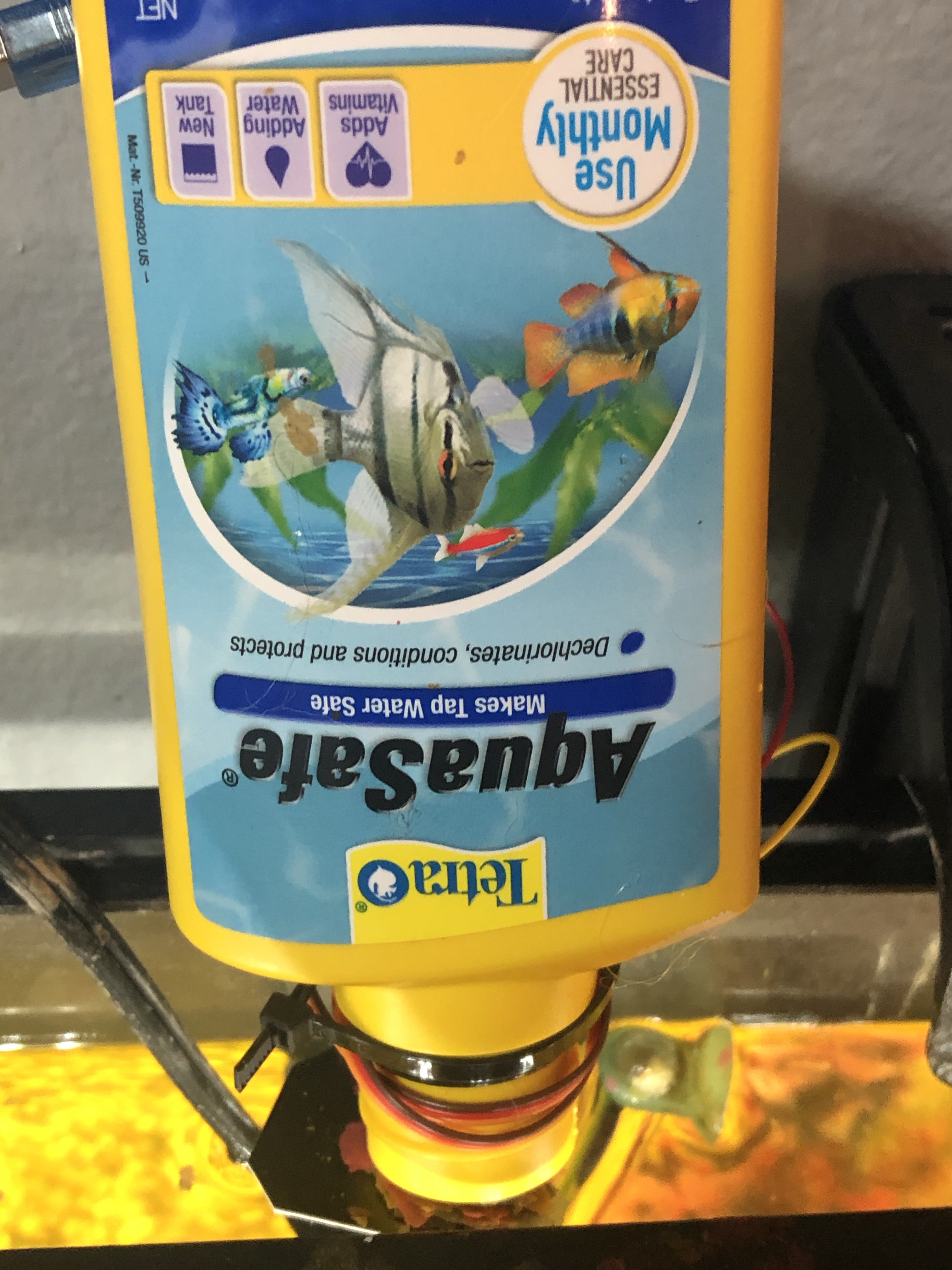
    After realizing the electronics portion of the project was coming together quite easily, I realized I had to start thinking about the physical container the food would reside in, and how I’d deliver it. I had a bottle laying around that I cut the bottom out of for the food to reside in.

    Now I had to think about how I would control the food from storage to delivery. For this, I decided to cut square of cardboard (from a JB Weld package of course) and attach it to the servo. Then, it was a quick ziptie to affix the servo-JBweld-stopper to the food storage container.

    Then I just had to get that bad boy moving:

    Working but…. I’ll kill my fish if they get that much.

    We had a working JBweld-cardboard-servo control, but it was going to need adjustment. I decided it would be a good idea at this point to start testing not only the angle to set the servo, but the frequency, friction, and amount of times to move the thing for the proper amount of food to fall.

    It was in testing that I discovered some physical bugs. Some people might have used a different material to simulate how the fish food would fall. Not me, I went and grabbed the flakes that were going to be used in a real-life simulation train like you fight was about all I learned in the Navy.

    I’m glad I did, because those stupid flakes didn’t want to come out of my bottle after the first couple of times, they’d get stuck in the larger canister but wouldn’t fall out of the mouth. Not good. I thought about some possible solutions. Solution #1 was to hot glue a pizza flyer into a cone and stick it in there:

    This was better but still not ideal. I needed something to disrupt the flakes and get them to fall. Ultimately I decided to hot glue a 3″ screw upside down against the JBweld-servo at the bottom so it would disrupt the entire food storage unit as it went back and forth.

    Bingo

    With that problem solved, I was able to tweak the code until I got the appropriate amount of food to fall on each run. Once satisfied with that, all that was really left was to put all the hardware together. Well I mean, there was that little “how will I power this thing” obstacle:

    imagine knowing this little about electricity

    Obviously that wasn’t going to work (lol) and servos require a bit more of a power draw than an LED. I remembered when I bought my house a few years ago the mortgage company gave me some small USB power banks. Perfect.

    Thanks OnQ!

    Now I could attach everything to a single contained unit! I used a plastic container that some screws came in, threw everything in there and zip tied it closed – now this is engineering!

    “it looks like an IED” -my wife

    With all that done, all that was left to do was send the device on its maiden voyage:

    my wife’s surprise at this device actually working says it all

    And that’s it! Here’s the final display:

    The profile actually doesn’t look that bad, and it’s self contained.

    Remember we talked about the timer? The timer situation isn’t ideal. I ran through some other options but for now I’m just going to run a delay() method for 24 hours. It’ll be off more and more every day because the processor can’t keep time like that, but I’m hoping it will run a week or so before it’s off by more than an hour. The other concern here is I have no idea what the total potential energy of the OnQ financial swag charger is or how long it will power the device for….. I guess we’ll figure it out.

    If you have any ideas or experience with this sort of thing, I’d be interested in hearing about what a more efficient way to power and run the timer might be. Ideally it would wake the device up every 24 hours, run the program, then sleep for another 24 hours.

    Anyway, here’s the code:

    #include <Servo.h>             //Servo library
     
    Servo fish_opener;        //initialize a servo object for the connected servo  
                    
    int angle = 0;
    int times_to_run = 2;
    int start;
    
    void setup() 
    { 
      fish_opener.attach(9);      // attach the signal pin of servo to pin9 of arduino
    
    } 
    
    void loop() 
    { 
    
      while(start <= times_to_run)
       {
        
        for(angle = 0; angle <= 45; angle += 6)    // command to move from 0 degrees to 45 degrees / increment of 6
        {                                  
          fish_opener.write(angle);                 //command to rotate the servo to the specified angle
          delay(10);                       
        } 
       
        delay(500);
        
        for(angle = 45; angle >=1; angle-=6)     // command to move from 45 degrees to 0 degrees / increment of 6
        {                                
          fish_opener.write(angle);              //command to rotate the servo to the specified angle
          delay(10);                       
        } 
      
          delay(500);
          start += 1;
       }
    
      start = 0; //reset while loop variable
      
      delay(86400000); //24 hours
      
    }

    All in all it was a fun project. I really enjoy the hardware side of things and hadn’t put something together a little more than two years ago with my crypto miner.

    Cheeky Bonus

    When I decided I was going to make this into a blog post I airdropped all of my photos and videos from my iPhone to my MacBook pro.

    fffffuuuuuuuuuuuuuuuu

    HEIC isn’t a friendly web format and there was no way I was going to open up each file in preview and export them. A little known trick with these newer formats like HEIC and WEBP is you can simply rename the file extension to convert. However, there was also no way I was going to manually click each file and rename the extension so I used this handy 8 line Python script:

     import os,sys
     folder = '/Users/RFaile/Desktop/fishfeeder'
     for filename in os.listdir(folder):
            infilename = os.path.join(folder,filename)
            if not os.path.isfile(infilename): continue
            oldbase = os.path.splitext(filename)
            newname = infilename.replace('.HEIC', '.jpg')
            output = os.rename(infilename, newname)

    Which fixed it right up in less than a second:

    Programmers are so lazy.

  • It is impossible to get hacked*

    It is impossible to get hacked*

    *No, not really. It’s just that when you say “I have been hacked!” you’re handing off responsibility. People think these things “just happen” – hackers hack, right?

    Wrong

    In the present day, people use the word “hacked” as if they were being targeted by hackers, then getting their accounts broken into by some sort of voodoo computer magic. The reality is: this couldn’t be further from the truth.

    This is *not* how someone got into your Facebook account 🤦‍♂️

    There are many forms of hacking. In this post, we’re going to focus on modern day account security since this is where most people will tell you they get “hacked”. When I say account security, think Facebook, Twitter, Apple, Netflix, Instagram, Email, etc.

    What is “hacking” ?

    The early days of the internet were basically the wild west. As a result, account penetration was a much simpler process. Passwords could be guessed over and over by programs until it guessed the right one (computers can do this really fast) and direct p2p connections were extremely common as well since IPs were more exposed to the (relatively) few folks online. When I first started using the internet in the late 90s, it was a common practice to open a direct client-to-client connection with a stranger in IRC to share a file. You would never do that today, and modern communication platforms like discord abstract things in a way where you’d never actually know the IP of a person you were sharing a file with.

    Nowadays, there isn’t a service with over 20 active users out there that doesn’t have rudimentary security in place like brute force protection. Your larger platforms with millions of users will have much more sophisticated protection. For example, if you live in Chicago and log into Facebook, then try and log in from Bangladesh 5 minutes later, the system is going to block that attempt. In short, it’s nearly impossible for someone who has never met you to hack you without you handing them the keys to do it.

    So how does it happen, then?

    Here are the most common ways an account gets compromised:

    1. Clicking phishing links in emails or on websites which redirect to false pages reconstructed to look like a service you use: Facebook, Apple, Amazon, Chase banking, etc. You’ve clicked this link because it said in the email that you had an urgent notice that needed to be resolved, then you willingly entered your account information, which someone now has.
    2. You have a ridiculously easy password. 123456, qwerty, password, hunter02, your name, your kid’s name, your pet… the list goes on. Don’t do it.
    3. You use a universal password. A universal password means you use the same password or a variation of it for multiple accounts. This is literally the worst thing you can do. Why? Because if an entity legitimately gets hacked, like Equifax in 2017 for example, whoever gets that data is going to try to login to every other service they can with the account credentials they gained. Fun fact: Equifax got “hacked” because their database username was admin and the password was….. admin! Yes, really.
    4. YOU PROVIDE answers to password security questions, sometimes freely. These are questions you often set up when creating an account: What is your birth date? What is your Mother’s Maiden Name? When is your anniversary? I can find out 90% of the answers to these questions just by being friends with the average person on Facebook. People that answer Facebook “quizzes”? *Shudders* 😬.
    5. This brings us into what modern day hacking usually comes down to: social engineering. People trick you into revealing information that help them hack you. Whether it’s over a social media DM, a video game, or on the phone. Modern day hackers are experts at piecing together seemingly innocuous information… until it’s too late.

    What can I do about it?

    Here’s are some extremely easy ways to significantly reduce your odds of getting an account compromised:

    1. Don’t click links in emails. If you get an account notice, log in directly through the organization’s portal and see what’s up. Reach out to the organization directly. If you get an email saying your Netflix account is frozen, try logging into Netflix at https://netflix.com – if you can login, the account obviously isn’t frozen.
    2. Use long, strong, unguessable passwords. Zhwg(=B)wMNOd(m1l;1BHl/-O?Z:kVko#aMaclcd is an example of a strong password (230 bits) combining numbers, letters, case, and special characters. Length is one of the things that make a password tough to hash, but isn’t the only factor.
    3. Even better is to get a password manager and let the password manager generate the passwords for you. The password manager will ensure the password is as difficult as can be for a machine to guess, while allowing you to one-click copy/paste it into the service in most cases.
    4. Never ever use the same password in more than one place. Seriously, don’t do it. This includes if your password is just an alteration of the same thing. For example: packers01, packers1!!, Packers!! might as well be the same password.
    5. Never store username/password credentials in your browser (when you log in to a site, this is the “save password” prompt that you see.) The first thing a “hacker” who gains control of your computer does is check your browser for usernames and passwords which can be viewed as plain text.
    6. Set up two-factor Authentication…. everywhere. There aren’t any mainstream services that don’t offer this. Start with your emails (yes you should have more than one) as they’re the key to most account recoveries. If someone gains access to your email, they can reset your accounts in other places by sending a password recovery link to your email. Your email needs to be the hardest thing to get into. This is like the easiest thing to do, yet 90% of people with a Gmail account do not have 2FA set up. That number is staggering.
    7. Don’t use text-message based 2FA. SIM cards can and do get compromised remotely. Someone can assume your SIM and have 2FA codes sent to them if they care enough. It has happened to people I work with. Instead, use an Authentication app like Google Authenticator or Authy. These apps generate tokens that change every 30 seconds that you’ll need to provide when logging into a 2FA-connected service.

    So is it really impossible to get “hacked” then?

    No. True security breaches happen every single day. Usually someone discovers and exploits a security vulnerability in a service and figures out a way to query a database or gain access to an administrator’s account. I talked about Equifax a bit, but this has happened to other large organizations as well.

    What then happens is now someone has a list of username/email and password combinations used for that service. They then use these lists and throw them at other services until they work, banking on the fact that people can (and do) use the same credentials across multiple services. These attacks are known as credential stuffing. Again, using unique passwords for every service greatly mitigates the impact this has on you.

    “Have I been Pwned” is a great site for checking if you have an account that’s been compromised in a data breach somewhere: https://haveibeenpwned.com/

    Is it all worth it?

    In a word: yes.

    Think of how much you value everything on your computer and on web services: photos of your loved ones, correspondence, financial information, your writing. Your computer and web accounts are access points to things you own, things that are yours. The small inconveniences here and there are big inconveniences for hackers. Do you know what more inconvenient than entering a 2FA code? Trying to explain to Facebook that it’s your profile that someone else is using or getting your money back when someone gets into your bank or credit services.

    In Summary

    These are the basics. As you’ve learned, simply enabling two-factor authentication on your email will make you a harder target than 90% of the 1.5 billion people who have a Gmail account.

    Use Two Factor Authentication. Never re-use passwords. Get a password manager.

    Questions? More tips? Let me know in the comments 👇