My day is a wall of notifications.
IRC, Slack, Discord, P2s, Adium jabber alerts, ntfy.sh pings, Telegram, WhatsApp, iMessage. I have thousands of streams of text coming at me every single day. It’s just ping ping ding ding ding from the moment I open my laptop until I close it.
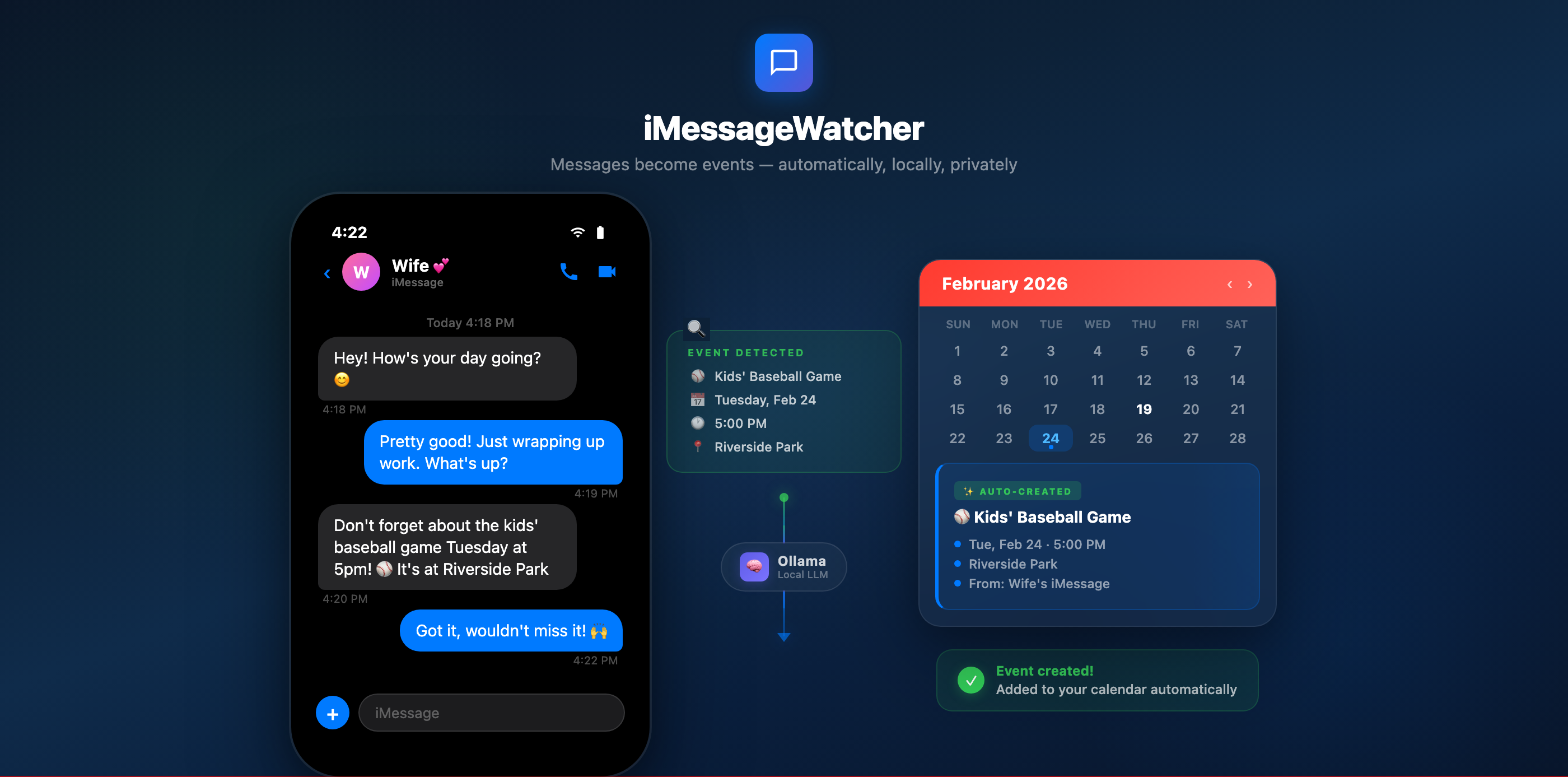
And somewhere in that noise, my wife texts me that the kids have a baseball game Tuesday at 5pm at Riverside Park.
She’s incredibly organized. She texts me about dates, plans, appointments, school events, family stuff. All the time. And she’s great about it. The problem is me. I’m neck deep in a Kubernetes migration or chasing a kernel bug, and by the time I come up for air, that text is buried under 47 Slack threads and a Discord ping about someone’s homelab.
So I built something to fix it.
iMessageWatcher

iMessageWatcher is a macOS menu bar app that watches my iMessages specifically from my wife and uses a local LLM to figure out if a message contains an event, a date, a reminder, or something I need to act on. If it does, the app automatically creates a calendar event with the name, location, time, and all that. No input from me. No copy-pasting. No “I’ll add that later” (which means never).
The whole thing runs locally. The LLM runs on my machine through Ollama. My wife’s messages never leave my device, never hit a cloud API, never get sent to OpenAI or anyone else. That was non-negotiable for me.
How It Works
The app sits in your menu bar and polls the iMessage database (~/Library/Messages/chat.db) every 60 seconds. It watches for new messages from whichever contact you configure (in my case, my wife’s number).

When it finds new messages, it grabs the recent conversation context and sends it to a local Ollama instance running deepseek-r1 (or whatever model you prefer). The LLM gets a prompt that basically says: “Look at this conversation. Is there an event, appointment, or task mentioned? If so, extract the name, date, time, and location. Return JSON.”
The app parses the response and creates the event in Apple Calendar. Done. My wife texts “Don’t forget about the kids’ baseball game Tuesday at 5pm, it’s at Riverside Park” and a few seconds later, “Kids’ Baseball Game” shows up on my calendar for Tuesday at 5:00 PM at Riverside Park. I don’t touch anything.
It also works with Apple Reminders, the Due app (a personal favorite reminder app), and ntfy.sh for push notifications. You can toggle each one on or off depending on your setup.
The Entire App Is 4 Files!!!1
This is probably my favorite part. The whole thing is 4 files with no Xcode project and no external dependencies:

- main.swift : App entry point. 5 lines.
- AppDelegate.swift : All the logic. Menu bar, SQLite scanning, LLM classification, EventKit integration, preferences window. Everything.
- Info.plist : Bundle metadata and permission descriptions.
- build.sh : Compiles the app, generates the icon programmatically, bundles everything into a proper .app.
No CocoaPods. No Swift Package Manager. No Xcode project file. You clone the repo, run ./build.sh, and you have a working macOS app. The build script even generates the app icon using Core Graphics in an inline Swift script. I love that kind of simplicity.
The compilation is just a single swiftc call:
swiftc -O main.swift AppDelegate.swift \ -framework Cocoa \ -framework EventKit \ -lsqlite3That’s it. Two Swift files, three frameworks, one binary.
Why Local LLM
I thought about this a lot. I could have used OpenAI’s API or Claude’s API and gotten better classification accuracy out of the box. But these are my wife’s text messages. They contain personal details about my kids, our schedules, where we’ll be and when. I’m not sending that to a third party.
Ollama makes this easy. You install it, pull a model, and you have a local inference server running on localhost. The app just makes HTTP requests to http://localhost:11434. Everything stays on my machine.
The classification accuracy with deepseek-r1 is honestly great for this use case. It’s not trying to write poetry. It’s looking at a text message and deciding “is this an event or not” and pulling out structured data. Local models handle that just fine.
The SQLite Trick
iMessage on macOS stores everything in a SQLite database at ~/Library/Messages/chat.db. The app reads it directly using the SQLite3 C API (no ORMs, no wrappers, just raw queries). It tracks which messages it’s already processed using ROWIDs so it never creates duplicate events.
You do need Full Disk Access enabled for the app since chat.db is in a protected directory. The app checks for this on launch and walks you through enabling it if needed.
What It Actually Catches
Here’s the kind of stuff that used to slip through the cracks and doesn’t anymore:
- “Soccer practice moved to Thursday at 4:30”
- “Dentist appointment for the kids next Wednesday at 2”
- “My mom is coming over Saturday around noon”
- “Can you take and pick up the kids from school tomorrow?”
- “I’m traveling for a work event the second week of April to Houston” (Yes it will do a multi day entry accurately”
- “Don’t forget we have that dinner thing Friday at 7, it’s at that Italian place downtown”
The LLM is good at parsing casual language. My wife doesn’t text in calendar-event format. She texts like a normal person. And the model handles it.
Try It
The repo is at github.com/rfaile313/iMessageWatcher. Clone it, run ./build.sh, configure your contact, and you’re done.
You’ll need:
- macOS 14+
- Ollama installed and running
- Full Disk Access for the app
- Calendar and Reminders permissions
It’s free, it’s open source, and your data never leaves your machine. If you’re someone who drowns in notifications and occasionally misses the important stuff from the people who matter most, this might help.
It definitely helped me stop being the guy who forgets about Tuesday at 5pm.
Leave a Reply