Category: Software

  • A commitment to Handmade

    A commitment to Handmade

    This tale begins as most of the major changes in my life do during a sleepless night. It was about 3 in the morning and I was browsing YouTube videos in bed when I stumbled upon what is possibly the best dev log I’ve ever seen:


    When professor rework showed up I just about lost it 🤣

    I was laying there in disbelief between fits of laughter at what this guy was doing. Two years Thomas Randall has been working on this game. He started in Unreal Engine, Rewrote in C++, and then finally in pure C. He did everything over this period of time from completely redesigning the game’s architecture to teaching himself physics on the fly. He also moved his entire game into a new engine in a week.

    Aside from the awesome flow and humor in the videos themselves (something about Aussie sarcasm is extra funny 😀) what really intrigued me was Randall’s commitment to his vision. As a programmer and game developer, I have settled time and time again like everyone else for various reasons: burnout, time constraints, money, external factors, you name it. Randall wasn’t willing to give an inch. He wants to make the game he sees in his mind and obviously doesn’t care about what it’s going to take to get there.

    That kind of passion is contagious. As I watched more of Randall’s videos I started getting introduced to some other folks in Randall’s network via the videos. One of these guys is a fellow by the name of Ryan Fleury. Ryan developed the Telescope game engine Randall’s game currently lives in, and also created a custom tool called Data Desk for building and parsing C-like data components.

    Ryan uses Data Desk in most of his software projects and I was blown away at the level of fidelity he was able to achieve in a 48 hour game jam with a limited 2d sprite sheet. It is seriously impressive. Highly recommend watching the first five minutes of the Jam:


    This got me interested in what Ryan was working on and I came across his project “The Melodist” and again was simply blown away by the general difference in quality and attention to performance and optimization that was going into this project. I’ve made a few games, and a lot of software. I’ve played a lot of games and used a lot of software. This was next level stuff.

    I reached out to Ryan to introduce myself and ask if he would be interested in “micro-mentoring” me. Ryan is kind of busy 🙂, but was kind enough to invite me to the Handmade Network.

    The reception I have received since joining the Handmade Network community has been incredible. Handmade Network lacks the elitism or snobbishness I’ve seen in some development circles. Veterans of the community answer day 1 questions from new members or guests with the same respect and enthusiasm that they treat each other with. It’s kind of interesting because you would think folks that are doing things purposefully harder and putting invisible restrictions on themselves would feel a certain superiority. The opposite couldn’t be more true.

    It was through this Network I started meeting other folks working on extremely interesting software with a high attention to detail on performance, customization, and portability.

    This is something I’ve been curious about for years:

    I’ve been programming for 15 years now. Recently, our industry’s lack of care for efficiency, simplicity, and excellence started really getting to me, to the point of me getting depressed by my own career and IT in general.

    Modern cars work, let’s say for the sake of argument, at 98% of what’s physically possible with the current engine design. Modern buildings use just enough material to fulfill their function and stay safe under the given conditions. All planes converged to the optimal size/form/load and basically look the same.

    Only in software, it’s fine if a program runs at 1% or even 0.01% of the possible performance. Everybody just seems to be ok with it. People are often even proud about how inefficient it is, as in “why should we worry, computers are fast enough”

    – Nikita Prokopov on Software Disenchantment

    This is especially true in Web where the landscape changes drastically and tempo can be unpredictable. One moment you’re living in a dollar sign world $ in jQuery and the next it’s all about React. One minute your project has 5 folders and the next you have thousands of node modules and GitHub is overloading mail servers sending you dependency security notifications every 5 seconds. It is madness.

    All of this culminated in a few personal commitments. I have made a commitment to begin on the path of “getting closer to the metal” by developing new projects in lower level languages (particularly C) and committing myself to a greater understanding of how things actually work. Decades of abstraction and seemingly infinite storage space and processing speeds have led us here. I have also decided to participate where possible to the Handmade Network, contribute, and give back where possible. For example, one of the members: Allen Webster achieved what many programmers aspire to do: built his own editor called “4coder”. 4coder is exactly the type and quality of software that has me so intrigued with the Handmade community. There’s even a Handmade Network Podcast (it’s excellent btw) where some of these folks discuss their motivations for these projects and problems they solved along the way.

    Through Handmade Network I have found all sorts of high quality developers and projects. Among these was a library called “Raylib” written by a guy named Ray from Barcelona, Spain. I was so impressed by the quality of Ray’s library (he has a whole suite of libraries, actually) and the levels at which he was willing to go to share his work. Aside from being under an extremely generous software license, Ray has worked tirelessly to ensure his software can be used at every level, on every platform, with virtually any utility.

    I was once again moved by the passion I saw coming through in Ray’s project. Ray also actively communicates with folks interested in using his software and is extremely kind and open to working towards anything that will help someone have an easier time. It is for this reason that Ray is one of the solo developers I decided to donate to during this time of COVID-19 uncertainty:

    Speaking of Raylib, the Raylib community recently held a 32×32 pixel game jam I decided to whip up a submission in about two days and enter! I found the constraints interesting: how cool can you make a game that has to fit in a 32×32 grid of individual “LED” and be 100% generated programmatically with zero external libraries outside of Raylib? Turns out, pretty cool:

    Flappy Box – my Raylib game Jam submission programmed in C

    While the game isn’t extremely graphically pleasing, it plays well and the entire executable program is 15kb!! For reference, the above GIF is 52 times larger than the game it’s displaying.

    You can check out the source code (or grab the executable and play) here:

    https://github.com/rfaile313/RayLib32x32GameJam

    One of the cool things about making something like this is it could be easily transitioned into a hardware project. For example, very little would need to be changed to port this game onto a bookshelf, sort of like what this guy did with Tetris:

    😎

    I also plan on utilizing Ray’s suite of tools and other Handmade Network community projects and affiliations in my quest to create better software. In the meantime I will also be giving back to the community in other ways. For example, here’s a quick tutorial on creating your first project in 4coder on Windows:


    The best way to help out Handmade Network and other Handmade projects is through the Handmade Fund. Other developers like Randall and Ray usually have other ways to give back if you like what they’re doing.

    I’d like to encourage anyone who feels like donating during this time to consider folks who are making amazing open source software. If you don’t feel like donating, consider giving back by sharing links to the software, authors, and community. They deserve it.
  • Automatic Fish Feeder

    Automatic Fish Feeder

    We’ve been “watching” my mother-in-law’s fish for the better part of two years. One of my least favorite tasks in the day is feeding the fish in the morning. There are a lot of morning tasks where putting my fingers near my mouth is a factor (brushing teeth, drinking coffee, etc.) and having to put nasty fish flakes on my hand is disruptive to those tasks.

    I decided to solve this with an Arduino and some stuff laying around the house. The project goal was to make a feeder that would feed the fish every 24 hours so I wouldn’t have to. I thought the hardest part would be the timer (spoiler alert: it was) but in actuality, engineering components that were never meant to feed fish was the really difficult and fun part.

    Inventory

    I bought and ELEGOO circuit board for the microcontroller, some random servos for the motorized mechanism, and a general electronics kit for wires and stuff. Don’t worry, those aren’t affiliate links playa… god forbid I get 20 extra cents.

    I started off by testing the board and some components. So far, so good.

    With that out of the way, I started working on getting the servo moving:

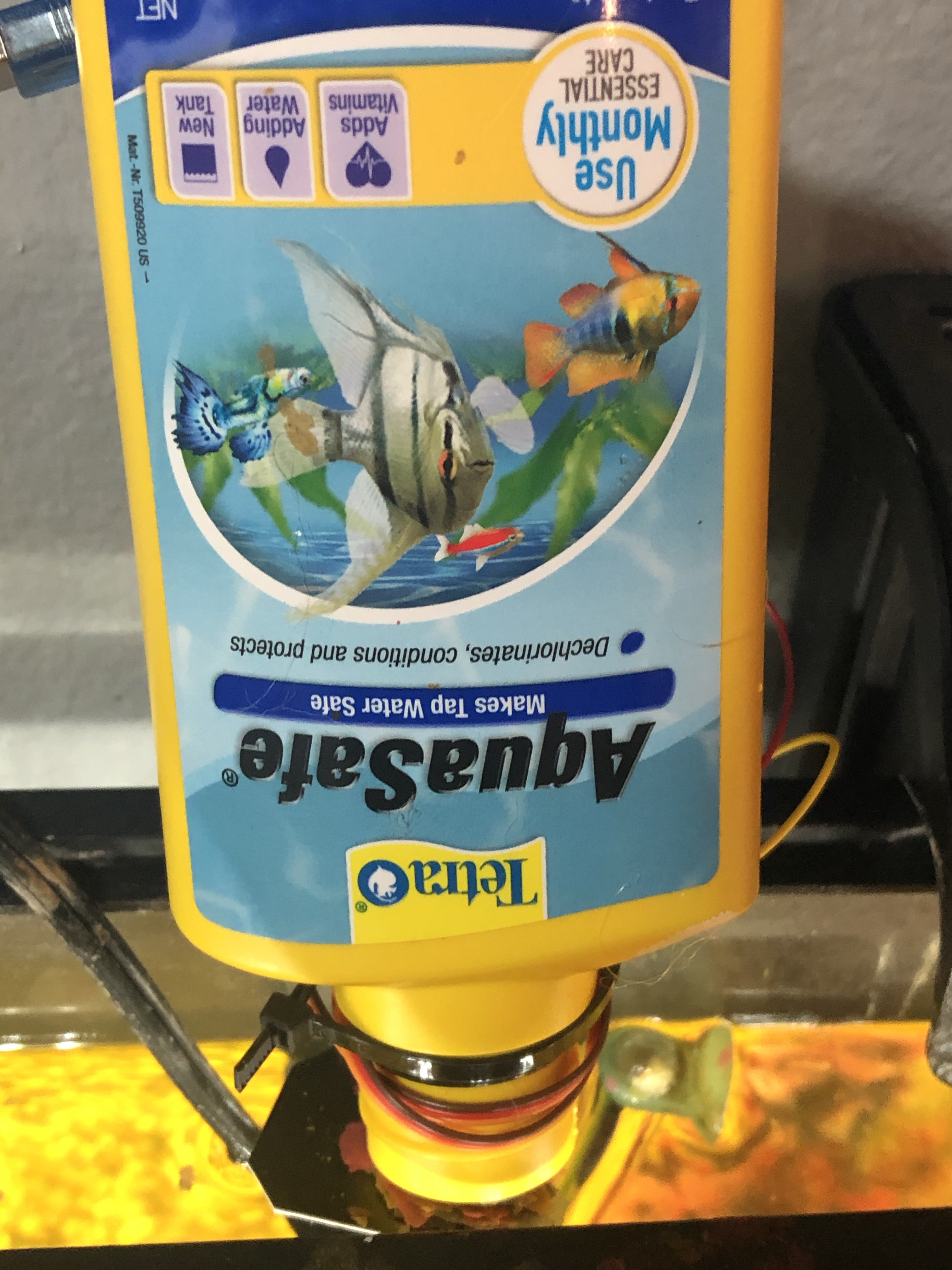
    After realizing the electronics portion of the project was coming together quite easily, I realized I had to start thinking about the physical container the food would reside in, and how I’d deliver it. I had a bottle laying around that I cut the bottom out of for the food to reside in.

    Now I had to think about how I would control the food from storage to delivery. For this, I decided to cut square of cardboard (from a JB Weld package of course) and attach it to the servo. Then, it was a quick ziptie to affix the servo-JBweld-stopper to the food storage container.

    Then I just had to get that bad boy moving:

    Working but…. I’ll kill my fish if they get that much.

    We had a working JBweld-cardboard-servo control, but it was going to need adjustment. I decided it would be a good idea at this point to start testing not only the angle to set the servo, but the frequency, friction, and amount of times to move the thing for the proper amount of food to fall.

    It was in testing that I discovered some physical bugs. Some people might have used a different material to simulate how the fish food would fall. Not me, I went and grabbed the flakes that were going to be used in a real-life simulation train like you fight was about all I learned in the Navy.

    I’m glad I did, because those stupid flakes didn’t want to come out of my bottle after the first couple of times, they’d get stuck in the larger canister but wouldn’t fall out of the mouth. Not good. I thought about some possible solutions. Solution #1 was to hot glue a pizza flyer into a cone and stick it in there:

    This was better but still not ideal. I needed something to disrupt the flakes and get them to fall. Ultimately I decided to hot glue a 3″ screw upside down against the JBweld-servo at the bottom so it would disrupt the entire food storage unit as it went back and forth.

    Bingo

    With that problem solved, I was able to tweak the code until I got the appropriate amount of food to fall on each run. Once satisfied with that, all that was really left was to put all the hardware together. Well I mean, there was that little “how will I power this thing” obstacle:

    imagine knowing this little about electricity

    Obviously that wasn’t going to work (lol) and servos require a bit more of a power draw than an LED. I remembered when I bought my house a few years ago the mortgage company gave me some small USB power banks. Perfect.

    Thanks OnQ!

    Now I could attach everything to a single contained unit! I used a plastic container that some screws came in, threw everything in there and zip tied it closed – now this is engineering!

    “it looks like an IED” -my wife

    With all that done, all that was left to do was send the device on its maiden voyage:

    my wife’s surprise at this device actually working says it all

    And that’s it! Here’s the final display:

    The profile actually doesn’t look that bad, and it’s self contained.

    Remember we talked about the timer? The timer situation isn’t ideal. I ran through some other options but for now I’m just going to run a delay() method for 24 hours. It’ll be off more and more every day because the processor can’t keep time like that, but I’m hoping it will run a week or so before it’s off by more than an hour. The other concern here is I have no idea what the total potential energy of the OnQ financial swag charger is or how long it will power the device for….. I guess we’ll figure it out.

    If you have any ideas or experience with this sort of thing, I’d be interested in hearing about what a more efficient way to power and run the timer might be. Ideally it would wake the device up every 24 hours, run the program, then sleep for another 24 hours.

    Anyway, here’s the code:

    #include <Servo.h>             //Servo library
     
    Servo fish_opener;        //initialize a servo object for the connected servo  
                    
    int angle = 0;
    int times_to_run = 2;
    int start;
    
    void setup() 
    { 
      fish_opener.attach(9);      // attach the signal pin of servo to pin9 of arduino
    
    } 
    
    void loop() 
    { 
    
      while(start <= times_to_run)
       {
        
        for(angle = 0; angle <= 45; angle += 6)    // command to move from 0 degrees to 45 degrees / increment of 6
        {                                  
          fish_opener.write(angle);                 //command to rotate the servo to the specified angle
          delay(10);                       
        } 
       
        delay(500);
        
        for(angle = 45; angle >=1; angle-=6)     // command to move from 45 degrees to 0 degrees / increment of 6
        {                                
          fish_opener.write(angle);              //command to rotate the servo to the specified angle
          delay(10);                       
        } 
      
          delay(500);
          start += 1;
       }
    
      start = 0; //reset while loop variable
      
      delay(86400000); //24 hours
      
    }

    All in all it was a fun project. I really enjoy the hardware side of things and hadn’t put something together a little more than two years ago with my crypto miner.

    Cheeky Bonus

    When I decided I was going to make this into a blog post I airdropped all of my photos and videos from my iPhone to my MacBook pro.

    fffffuuuuuuuuuuuuuuuu

    HEIC isn’t a friendly web format and there was no way I was going to open up each file in preview and export them. A little known trick with these newer formats like HEIC and WEBP is you can simply rename the file extension to convert. However, there was also no way I was going to manually click each file and rename the extension so I used this handy 8 line Python script:

     import os,sys
     folder = '/Users/RFaile/Desktop/fishfeeder'
     for filename in os.listdir(folder):
            infilename = os.path.join(folder,filename)
            if not os.path.isfile(infilename): continue
            oldbase = os.path.splitext(filename)
            newname = infilename.replace('.HEIC', '.jpg')
            output = os.rename(infilename, newname)

    Which fixed it right up in less than a second:

    Programmers are so lazy.

  • It is impossible to get hacked*

    It is impossible to get hacked*

    *No, not really. It’s just that when you say “I have been hacked!” you’re handing off responsibility. People think these things “just happen” – hackers hack, right?

    Wrong

    In the present day, people use the word “hacked” as if they were being targeted by hackers, then getting their accounts broken into by some sort of voodoo computer magic. The reality is: this couldn’t be further from the truth.

    This is *not* how someone got into your Facebook account 🤦‍♂️

    There are many forms of hacking. In this post, we’re going to focus on modern day account security since this is where most people will tell you they get “hacked”. When I say account security, think Facebook, Twitter, Apple, Netflix, Instagram, Email, etc.

    What is “hacking” ?

    The early days of the internet were basically the wild west. As a result, account penetration was a much simpler process. Passwords could be guessed over and over by programs until it guessed the right one (computers can do this really fast) and direct p2p connections were extremely common as well since IPs were more exposed to the (relatively) few folks online. When I first started using the internet in the late 90s, it was a common practice to open a direct client-to-client connection with a stranger in IRC to share a file. You would never do that today, and modern communication platforms like discord abstract things in a way where you’d never actually know the IP of a person you were sharing a file with.

    Nowadays, there isn’t a service with over 20 active users out there that doesn’t have rudimentary security in place like brute force protection. Your larger platforms with millions of users will have much more sophisticated protection. For example, if you live in Chicago and log into Facebook, then try and log in from Bangladesh 5 minutes later, the system is going to block that attempt. In short, it’s nearly impossible for someone who has never met you to hack you without you handing them the keys to do it.

    So how does it happen, then?

    Here are the most common ways an account gets compromised:

    1. Clicking phishing links in emails or on websites which redirect to false pages reconstructed to look like a service you use: Facebook, Apple, Amazon, Chase banking, etc. You’ve clicked this link because it said in the email that you had an urgent notice that needed to be resolved, then you willingly entered your account information, which someone now has.
    2. You have a ridiculously easy password. 123456, qwerty, password, hunter02, your name, your kid’s name, your pet… the list goes on. Don’t do it.
    3. You use a universal password. A universal password means you use the same password or a variation of it for multiple accounts. This is literally the worst thing you can do. Why? Because if an entity legitimately gets hacked, like Equifax in 2017 for example, whoever gets that data is going to try to login to every other service they can with the account credentials they gained. Fun fact: Equifax got “hacked” because their database username was admin and the password was….. admin! Yes, really.
    4. YOU PROVIDE answers to password security questions, sometimes freely. These are questions you often set up when creating an account: What is your birth date? What is your Mother’s Maiden Name? When is your anniversary? I can find out 90% of the answers to these questions just by being friends with the average person on Facebook. People that answer Facebook “quizzes”? *Shudders* 😬.
    5. This brings us into what modern day hacking usually comes down to: social engineering. People trick you into revealing information that help them hack you. Whether it’s over a social media DM, a video game, or on the phone. Modern day hackers are experts at piecing together seemingly innocuous information… until it’s too late.

    What can I do about it?

    Here’s are some extremely easy ways to significantly reduce your odds of getting an account compromised:

    1. Don’t click links in emails. If you get an account notice, log in directly through the organization’s portal and see what’s up. Reach out to the organization directly. If you get an email saying your Netflix account is frozen, try logging into Netflix at https://netflix.com – if you can login, the account obviously isn’t frozen.
    2. Use long, strong, unguessable passwords. Zhwg(=B)wMNOd(m1l;1BHl/-O?Z:kVko#aMaclcd is an example of a strong password (230 bits) combining numbers, letters, case, and special characters. Length is one of the things that make a password tough to hash, but isn’t the only factor.
    3. Even better is to get a password manager and let the password manager generate the passwords for you. The password manager will ensure the password is as difficult as can be for a machine to guess, while allowing you to one-click copy/paste it into the service in most cases.
    4. Never ever use the same password in more than one place. Seriously, don’t do it. This includes if your password is just an alteration of the same thing. For example: packers01, packers1!!, Packers!! might as well be the same password.
    5. Never store username/password credentials in your browser (when you log in to a site, this is the “save password” prompt that you see.) The first thing a “hacker” who gains control of your computer does is check your browser for usernames and passwords which can be viewed as plain text.
    6. Set up two-factor Authentication…. everywhere. There aren’t any mainstream services that don’t offer this. Start with your emails (yes you should have more than one) as they’re the key to most account recoveries. If someone gains access to your email, they can reset your accounts in other places by sending a password recovery link to your email. Your email needs to be the hardest thing to get into. This is like the easiest thing to do, yet 90% of people with a Gmail account do not have 2FA set up. That number is staggering.
    7. Don’t use text-message based 2FA. SIM cards can and do get compromised remotely. Someone can assume your SIM and have 2FA codes sent to them if they care enough. It has happened to people I work with. Instead, use an Authentication app like Google Authenticator or Authy. These apps generate tokens that change every 30 seconds that you’ll need to provide when logging into a 2FA-connected service.

    So is it really impossible to get “hacked” then?

    No. True security breaches happen every single day. Usually someone discovers and exploits a security vulnerability in a service and figures out a way to query a database or gain access to an administrator’s account. I talked about Equifax a bit, but this has happened to other large organizations as well.

    What then happens is now someone has a list of username/email and password combinations used for that service. They then use these lists and throw them at other services until they work, banking on the fact that people can (and do) use the same credentials across multiple services. These attacks are known as credential stuffing. Again, using unique passwords for every service greatly mitigates the impact this has on you.

    “Have I been Pwned” is a great site for checking if you have an account that’s been compromised in a data breach somewhere: https://haveibeenpwned.com/

    Is it all worth it?

    In a word: yes.

    Think of how much you value everything on your computer and on web services: photos of your loved ones, correspondence, financial information, your writing. Your computer and web accounts are access points to things you own, things that are yours. The small inconveniences here and there are big inconveniences for hackers. Do you know what more inconvenient than entering a 2FA code? Trying to explain to Facebook that it’s your profile that someone else is using or getting your money back when someone gets into your bank or credit services.

    In Summary

    These are the basics. As you’ve learned, simply enabling two-factor authentication on your email will make you a harder target than 90% of the 1.5 billion people who have a Gmail account.

    Use Two Factor Authentication. Never re-use passwords. Get a password manager.

    Questions? More tips? Let me know in the comments 👇

  • Windows Subsystem for Linux (WSL)

    Windows Subsystem for Linux (WSL)

    I mention this a lot, but it’s no secret that the Windows command-line experience has been lackluster for the past decade or two. It’s quite apparent that Microsoft is well-aware of this, and we’ve seen improvements with Microsoft Powershell (CMD prompt is straight doo-doo 💩) but it isn’t perfect.

    I’m going to sound like a Microsoft fan-boy, but they’ve been seriously impressing me lately. The VSCode editor is best-in-show (seriously, who isn’t using it as their code editor in 2019) and everything appears to be moving to a more open source environment. What I appreciate most here from Windows is that, instead of try and re-create their entire OS structure to match a UNIX based system, they simply…. give you the UNIX based system.

    Enter WSL

    Windows Subsystem for Linux (WSL) is a compatibility layer for running Linux binary executables natively on Windows 10 and Windows Server 2019. In lay terms, you can pull up a lightweight, fully functional Linux terminal right in your desktop without running a virtual machine. Yes, really.

    1 Technically it’s a lightweight VM but it feels so different.

    Why is this important?

    While more and more software developed is cross-platform, the actual development of most non-Windows software (think .Net, C#/++) is done in UNIX environments (Linux/MacOS). Don’t believe me? Check out the Stack Overflow Developer Surveys for the past two years (2019 and 2018) – more than half are using a Linux-based system or MacOS.

    But that’s just a survey. In practice, even some of our products at Automattic don’t compile on Windows. Calypso, for example, The JavaScript and API powered WordPress.com platform will not compile in a Windows environment… at least, I’m not aware of anyone that has a working dev environment in Windows, Automattician or open-source contributor alike.

    Beyond that, with a working Linux environment that feels natural, we can grab all of our favorite software packages and set up environments with common UNIX-like commands without having to head to stack overflow (or this site 😁) every time we want to set an alias.

    So how do you get started?

    Craig Loewen over at Microsoft has put together some really excellent guides to getting started over at the official docs in the Microsoft Devblogs, and it really feels like I’d be doing him (and you) a disservice by not pointing you there. Here are some of my favorites:

    In general though, head to the Microsoft store on your Windows machine and search “Linux”. There’s just about every distro in there, from Debian to Kali. I prefer Ubuntu, so that’s what I use.

    One that’s downloaded, simply launch the Terminal and you’re good to go.

    ⚠ At the time of this article, you can’t directly modify files in WSL from Windows Explorer. [Edit: Craig mentions you can actually modify your Linux files directly from the File Explorer in Windows Version 1903 and Higher!] 🎉

    Modification of Linux files through Explorer

    So how do you interact/program with Software packages?

    If you have WSL open, all you need to do is open VSCode on your windows machine and it will prompt you to install the Remote – WSL extension.

    Then, simply type code . in your Linux terminal like you normally would, and it’ll launch your directory in VSCode…. Magic!

    It’s not perfect

    Yet. I’m hoping to see improvements as Microsoft gets closer and closer to releasing the new Windows Terminal (have you seen that commercial? huge kudos to Kayla & her team over at Microsoft 🔥) but at the time of this article I’m not able to set up a Docker container on it, and a few other caveats as well. For the most part though, I’m loving the path Microsoft is on and will continue to cheer them on as they do great things.

  • WordPress.com vs WordPress.org

    WordPress.com vs WordPress.org

    On top of working for Automattic on WordPress.com and our other products, I spend a lot of time volunteering in the open-source WordPress community, sometimes referred to as WordPress.org.

    Now, if you aren’t familiar with the differences with WordPress.com and WordPress.org, it goes like this: Once upon a time there was this fellow named Matt Mullenweg. He and Mike Little released the open-source WordPress software in 2003. WordPress initially started out as blogging software but eventually evolved into a rich and the most widely used content management system (CMS) in the world.

    So what is WordPress.org?

    So, we know WordPress is the software itself. WordPress.org refers to the open source community that supports, develops, and maintains the WordPress software. No single person or entity is in charge and anyone can contribute.

    Now, anyone can download this free software, and install it on a web host or local server. You can hack it, break it, bundle it up and redistribute it (within the parameters of the licensing) and essentially do whatever you want with it.

    Here’s the tricky part

    You still have to find a web host (unless you’re going to run the web server out of your house, which isn’t advisable.) There are lots of hosts out there, with all sorts of different features. WordPress.org has a few recommended hosts here. This is the part where I think people get most confused.

    So, you’ve purchased hosting somewhere, installed WordPress, registered a domain, and connected it to the site. Now you’re setting up the site and you have a question. Who do you ask? WordPress.com right? Wrong!

    WordPress is open-source software. It’s developed, maintained, and supported by the WordPress.org community. You can ask for help on the WordPress.org forums (and there are lots of helpful volunteers!) or the developer of a specific plugin or theme, but that’s it!

    What about my host? They might be able to help. However, most hosts are there to help you with the actual configuration of the web server, and not a whole lot beyond that. There are exceptions to this rule, and hosts like Bluehost have support for the WordPress software, but for the most part, you’re on your own.

    This has its benefits. You’re virtually unlimited in what you can do with your site, the sky (and your hosting restrictions) are the limit.

    Here’s what most people don’t know, though:

    Sure, you can host a site for dirt cheap but it’s probably shared hosting and the bandwidth is likely not great either. How much web storage do you have? If something breaks, what’s the support like? If they’re charging you for SSL, get out. An SSL certificate costs no one anything and it’s a bogus charge, in my opinion.

    In terms of bandwidth: you may not think this is important but if you ever have more than one person connecting to your site, it’s a concern. Take a look, for example, of 50 simulated requests to this site:

    50 requests served in about 5 seconds. I could run that script all day without any issues.

    Let’s compare this to what some other hosts might look like:

    How much do you know about software, web development, security? These are legitimate concerns that any reasonable site owner should have. Remember how I said you’re virtually unlimited in what you can do? You’re also responsible for the security of your site and keeping things up to date. It takes work. Because WordPress is open-source software, hackers find vulnerabilities all the time. These are often patched in WordPress core before they have any real effect on people, but folks install plugins made by third party developers and/or fail to update core and get exploited. Happens every day.

    If you’re a web developer who absolutely knows what they’re doing, this may not be a concern for you. But for the average user, this is a really big deal.

    Enter WordPress.com

    Remember Matt Mullenweg? Shortly after founding WordPress he started his own company, called Automattic, which makes a product called WordPress.com among many others. Automattic is passionate about making the web a better place. The vast majority of its work is available to the public under the GPL, and they heavily contribute to the WordPress.org community and open-source WordPress software.

    So what is WordPress.com?

    WordPress.com at its core is a hosting service like some we’ve discussed above, but it’s really much more than that. It’s a fully managed, site building service, it’s a domain registrar, it’s an all-in-one platform for you to publish your message to the world. It’s much, much more.

    So right out of the gate: You can start on WordPress.com for free. Granted of course, you’ll be using a subdomain on a free site, and some other restrictions, but you can still start writing content, uploading pictures and customizing a theme and site for free. I’m not really aware of another hosting service that will give you a space to host a site for free, especially not a WordPress installation, and especially not with unlimited bandwidth. So that’s nice.

    You can upgrade to a paid plan anytime, or start out with one, and the benefits are massive. On top of all of the features listed at https://wordpress.com/plans you get:

    • Access to run ads with one click (monetization)
    • Unlimited Bandwidth (seriously, it’s blazing fast too)
    • Updates and security all managed for you (this is huge)
    • Real-time backups
    • Free domain for the first year
    • 24/7 support

    Speaking of support: The support at WordPress.com is no joke. These aren’t folks reading off a script, these are bloggers, developers, designers, marketers… in fact, every single person that works at Automattic does a support rotation at least once a year (including Matt himself!)

    Well, we tried.

    There’s also a dedicated team of folks 300+ strong who guide, troubleshoot, live and breathe WordPress all day long. These folks, called Happiness Engineers (👋) do just that by providing world class guidance and troubleshooting day in and day out for our 156 Million+ users across our products. We’ll show you how to set up a WordPress site, we’ll walk you through theme setup, we’ll write CSS for you, we’ll provide advice and best practices for SEO, and we’ll do it all in real time – all for as little as $5, or $8 a month on a Personal or Premium plan.

    We’re also a well-established entity. We’ve been around for 14 years now and we aren’t going anywhere. If you aren’t satisfied with your purchase we have a 30 day no-questions-asked refund policy at WordPress.com on all WordPress.com Products and 5 days for domains.

    We keep things secure. All updates to WordPress core (the open source software) are automatically applied to your WordPress.com site in addition to our proprietary software and most if not all features of the Jetpack plugin (another product we make) see: social media sharing, static file hosting, lazy loading images, video players, advanced SEO, eCommerce tools, premium themes, the list goes on…

    So why doesn’t everyone use WordPress.com?

    Because it has its pros and cons. I’d honestly say (and I look at thousands of sites a month) that for 90% of folks, it’s exactly what you need. You can’t out-scale us. If you get really big, we even have a VIP platform where we have clients like Time, CNN, Variety, People, New York Post, Capital One, even Facebook. Is your site getting more clicks than Time Magazine? Probably not.

    However, that remaining 10% of folks do need the extensibility that is simply much easier on a self-hosted solution. Especially for developers. They may have a client with specific needs. WordPress is powerful, but requires an advanced knowledge of web development to really get in there and work requirements out around a client. If you need to heavily modify or extend the software’s functionality – a self-hosted solution is probably the way to go.

    Lastly, there are a lot of myths floating around.

    Common Myths:

    “You don’t own your site at WordPress.com”

    This simply isn’t true. I don’t know how this rumor got started but I see it everywhere. Some hosts/platform might hold your site and/or content hostage, but we don’t. At My Sites > Settings > Export we provide the option to Export all (or specific) text content (pages, posts, feedback) from your site and also the option to Download all the media library files (images, videos, audio and documents) from your site.

    We also explicitly say this in our Terms of Service:

    Our service is designed to give you as much control and ownership over what goes on your website as possible and encourage you to express yourself freely. You own all content you post to your website.

    https://en.wordpress.com/tos/ Section 7: Service Specific Terms

    “You can’t use plugins”

    This actually used to be true, and still is for non-Business or eCommerce plans but this is because of the way the site architecture is set up on lower-than-business plans. With a WordPress.com Business plan you can install plugins, upload custom themes, have unlimited storage and bandwidth and literal 24/7 real time support among a plethora of other ridiculous features at $25 a month.

    “I need a website, not a blog”

    While WordPress itself started out as blogging software, it’s now a very robust CMS and this is true on .com and .org. At WordPress.com, we use “website” and “blog” as interchangeable terms. All of our themes can be used for either a website or a blog. Our default layout is a blog-style format. Take a look at this video tutorial for a walkthrough on how to change your theme’s layout to a website-style format.

    At the end of the day:

    WordPress.com and WordPress.org both have their pros and cons. WordPress.com is sort like having an apartment. You can’t put in a swimming pool, but if something breaks or you need something you’ll get expert help at no additional cost to you. If you aren’t sure how to paint the walls of your apartment, we’ll buy the paint and show you how. WordPress.org is sort of like owning a house. Sure you can knock down that wall to join two rooms but it’s on you if the house falls, as well.

    That’s a pretty base comparison, but hopefully you get the point. Ultimately, it’s your choice. I hope this post was able to clear a few misconceptions surrounding these two platforms for you.

    Do you have any other questions? Let me know!

  • Setting an Alias in Windows Powershell.

    Setting an Alias in Windows Powershell.

    It’s no secret that the UNIX terminal is a far superior and preferred method for command-line computing. Windows, it seems, is well-aware of this and determined to improve the command line tools on its Operating Systems.

    VScode has already come such a long way. In my opinion, their open-source editor is the best on the market. It seems there’s been a change in direction at Windows as of late, as they ease towards a more open-source and user-centric approach. This is exemplified in Microsoft’s new Windows Terminal, a UNIX-style terminal under development for Windows. There’s already Linux subsystem tools available on some distributions, but it’s finicky at best in its current state.

    While I’m hopeful for the future, I’ve come to enjoy how much closer Windows Powershell is to a UNIX system in terms of syntax and functionality. It isn’t perfect, but I’m determined to make it as close and comfortable as possible.

    Setting an Alias in Powershell

    There’s a lot of conflicting information about there, and the Microsoft docs are kind of vague. After doing some research, here’s what I’ve gathered:

    • It’s not a good idea to add this directly to your $env:WINDIR (sort of like a UNIX root)
    • The recommended way is to add it via a user profile

    Steps from here vary, but I’ve tested this method across a few systems and it seems to be effective.

    • You’ll want a profile1.psl file. This isn’t created by default. To create the profile1.psl file, open up Powershell and type in the following command:
    • new-item $PROFILE.CurrentUserAllHosts -ItemType file -Force
    • to access the file, type in the next command:
    • ise $PROFILE.CurrentUserAllHosts
    • (Conditional) This should be enough, but if you have an issue with this that means you need to change your execution policy: run
      Set-ExecutionPolicy -Scope CurrentUser then RemoteSigned then run the ise command again.

    Otherwise, the first two commands should be enough to create the profile then pull it up in Windows Powershell ISE (Integrated Scripting Environment) – it looks like this:

    From here, we can set alias’ that call functions. You can see in my example that I’ve written a function that:

    • Changes directory
    • Opens Google in a web browser
    • Removes a file in the current directory named fileName.txt

    All we have to do now is set up an alias that calls that function. Anywhere below the closing bracket of the function we can write:

    Set-Alias google goSomewhereThenOpenGoogleThenDeleteSomething

    Now save, exit the ISE and Powershell and restart. You should be able to type google as a command with nothing else to run the function you just created. It might throw an error saying: rm : Cannot find path 'C:\Users\fileName.txt' because it does not exist. which is expected but if it opens Google in a browser, that means it was successful.

    Handy to do

    I’ve set Alias’ for a lot of things but most handy are to set alias’ to check your profile’s location and open it in case you want to add more, you won’t have to remember the steps.

    I use profile which displays:

    and as you can see above, profile_open which runs the command to open my profile in the ISE, ise $PROFILE.CurrentUserAllHosts

    In addition to that, I set commonly used scripts and programs on Alias for convenience so I don’t have to navigate to a directory and execute with the program prefix. E.g. my most recent ratelimit script I wrote for work, I just type ratelimit from anywhere to start the program:

  • One Rep Max Calc and SSL oh my!

    One Rep Max Calc and SSL oh my!

    Today I touched up https://strong.rudyfaile.com/ by adding SSL and forcing http redirects. I should have done this in the first place, seeing how easy SSL with Let’s Encrypt is but hey, it’s done now. I also put SSL on the other subdomain projects.

    I also added a one rep max calculator which lives at https://max.rudyfaile.com/ (and is linked in the 5/3/1 program generator, see below:)

    😄

    The purpose of the one rep max calculator is to help you find a 1 rep max if you aren’t looking to necessarily lift the absolute amount of weight that you absolutely can in a single rep. In a perfect world, you should always try.

    Let’s say however that you generate a four-week program and on week 3 you miss your lift for 1+ reps in the last set (set 3). It will be tough to calculate an accurate four week program without a number, and it’s never a good idea to guess. Instead, you could lift a lower weight (not too much lower) for as many reps as you can using the 1 rep max calculator. This will allow you to use a decently estimated number for the next program generator.

    In other news: https://strong.rudyfaile.com/ and https://game.rudyfaile.com/ have SSL now too. One cool thing about that is you can play Lucy’s Adventure offline as a result (assuming you’ve already loaded the game) 😄

  • strong.rudyfaile.com

    strong.rudyfaile.com

    I couldn’t sleep last night so I decided to whip up a 5/3/1 barbell training program generator in PHP for all to use freely 😄. Since finishing my 100 days of running I have more time available to me to both program and lift weights, and combining these two hobbies is one of my favorite things to do 💪🤓 💪.

    The program lives here: http://strong.rudyfaile.com/

    If you aren’t familiar with Jim Wendler’s 5/3/1 I highly recommend looking into it. Jim is a no-bs strength guru and I’ve found his program, as is its namesake, as the Simplest and Most Effective Training System to Increase Raw Strength. The beauty of the program is its built around you, and adjusts to your progress every four weeks. Essentially, you start out by testing your one rep maxes in the four core compound lifts: Overhead Press, Deadlift, Bench Press, and Squat. From there, the calculator generates a 4 week program based on your lifts. In week 1 you’re doing 5 reps across the board, week 2 three reps, and week 3 is your 5/3/1 week where you’re looking to max out. This is the most important week as the lifts here determine the following 4 weeks’ program. Thus, you have an ever-evolving, infinite duration strength training program custom tailored to your needs.

    This was the first time I’ve cracked my knuckles to square off with PHP in a long time but I was extremely pleased with how fast I was able to jump back into it and rapidly port my command line Python version of this program to a web-driven one.

    Mostly, I’m a terrible designer and I’m so pleased with how this came out on both the web and mobile 🙂 – especially considering this was developed bare-bones from the ground up.

    I did a decent job of sanitizing input and ensuring validation with functions like isset() – right now the only bug I’m aware of that I need to work out is the sizing on mobile but it’s tough to keep things readable in a table and still have it fit on the screen, still works though ¯\_(ツ)_/¯. I also chose to use $_GETmethods instead of _$POST so that folks could save the permalink if they wanted to revisit their program without re-entering the numbers (I added a nifty one-click button for this, too!)

    On top of enjoying PHP development for once I got deep in the woods in Apache’s virtual hosts to set Lucy’s Adventure and my 5/3/1 calculator as separate directories on the same web server which is pretty cool. I’m having fun tinkering with all this stuff and am excited to add more projects to the *.rudyfaile.com subdomains!

    If you have any questions about how to use the program or strength training theory in general feel free to leave a comment below 👇 or contact me privately. Also looking for feedback on what would make the program more intuitive (design suggestions are probably hopeless 😅.)

  • Lucy’s Adventure call for testing!

    Lucy’s Adventure call for testing!

    I made a recent post about my progress working on this game.

    If you’d like, you can play the work in progress 👉 here!

    Feedback/comments/suggestions welcome 😄

    I’m still working on the final art/sounds/music and adding more levels. I’ll have controller support in soon as well 🙂

  • Fortuitous A.I. Mechanics

    Fortuitous A.I. Mechanics

    Kristen is out of town today which means I have some free time to drill down and work on my little game side project. The working title is “Lucy’s Adventure” (Lucy being the fox). It’s a Super Meat Boy/Boshy inspired platformer that aims to be progressively difficult, but in a non-bullshit type of way. Translation: death happens a lot, but the game telegraphs to the player how. The goal is for the player to feel like every death could have been avoidable.

    After completing the game’s first two levels, aptly named “Baby Steps” and “Mechanics” I started work on level 3: the game’s first boss fight. In this fight, Lucy picks up an M16 which initiates a battle with the Boss of the first three stages: Lava Lord.

    Sometimes when programming, the funniest and/or most unexpected things can happen. In my case, this usually is from a result of lack of understanding, a mistake, or more often: laziness. These two images sum this up perfectly:

    For example, I didn’t want to redraw or edit sprites to have the gun move with Lucy, so the gun destroys itself and redraws every frame on Lucy’s position. It works great, and looks hilarious. Perfect.

    😂

    Even more funny was when I started programming the Boss’ A.I. It’s a pretty challenging process in itself, lots of function tail calls and recursion until certain conditions are met, signalling the boss to change states. I created some states to bring what I’ve considered abstractly to the game. When I ran my build, I just about lost it:

    Holy…

    The problem was obvious: I was calling the function that handled the Boss’ attack incorrectly. However, the outcome was better than if the game were working properly: it was harder to dodge, and actually looked pretty cool.

    LAME

    After I fixed it (he only throws a single fireball, which was the original intention) it felt… lame. Obviously the movement will be sped up, but a single fireball at this point seems unfulfilling.

    I wonder if I should change it back. If I do, I wonder if creating so many instances of the fireball object like that will run poorly in some browsers or devices. I wonder if I should find a way to make it look like that properly without devastating that poor Android device running KitKat.

    I wonder how many developers work on software and make mistakes that become features. It’s really a great feeling. I imagine it’s like painting a picture and spilling the paint bucket on the canvas. While you’re initially worried that you screwed up, on second look – that blotch kind of looks like something, let me add a few more colors. Wow, that mistake really made the piece!

    At a minimum, I definitely think I need more fireballs on this canvas 🔥.